IDE Support
GALA ships with a GoLand/IntelliJ plugin and an LSP server that work together to provide a full development experience. The plugin handles local features instantly (syntax highlighting, code folding, live templates), while the LSP server (gala lsp) adds type-aware intelligence (diagnostics, completion, inlay hints, go-to-definition).
Syntax Highlighting
The plugin provides rich syntax highlighting for all GALA constructs — keywords, types, string interpolation expressions, comments, operators, and built-in functions. Methods with receivers, pattern matching, and sealed type destructuring are all highlighted with distinct colors.
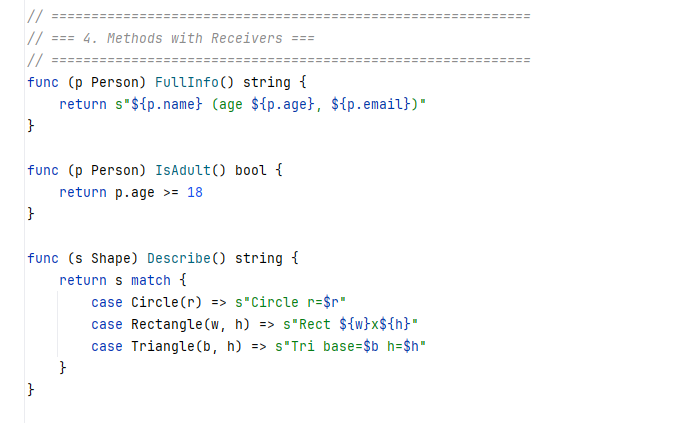
The screenshot shows methods with receivers (func (p Person) FullInfo()), string interpolation (s"${p.name} (age ${p.age})"), and pattern matching on sealed types (case Circle(r) => ...) — all with distinct semantic coloring.
Type-Aware Code Completion
After typing a dot (.), the LSP server resolves the receiver’s type and offers context-aware completions — only the methods and fields that belong to that type. Each suggestion includes the full type signature.
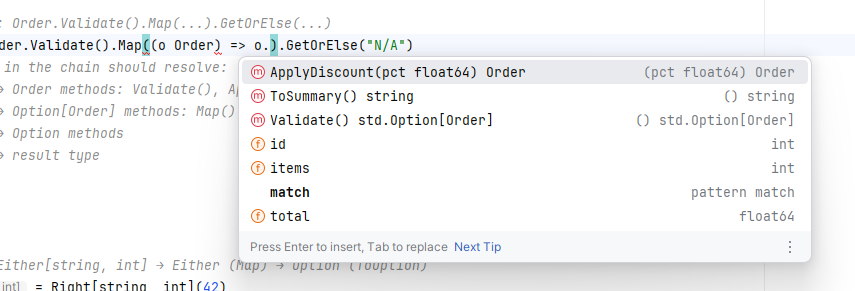
Here the cursor is inside a .Map() lambda on an Order value. The completion popup shows Order’s methods (ApplyDiscount, ToSummary, Validate) with return types, and its fields (id, items, total) — all resolved from the transpiler’s type information.
Inlay Type Hints
The LSP server displays inferred types as inline hints next to val and var declarations. These hints come directly from the transpiler’s type resolver — the same types used for code generation — so they are always accurate.
Basic declarations and tuples
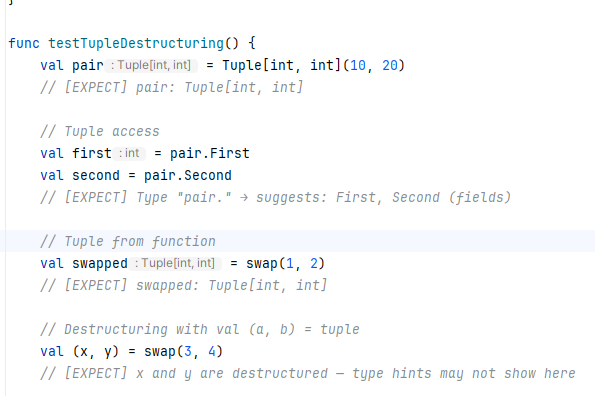
Inlay hints show Tuple[int, int] for pair declarations, int for simple values, and track types through function returns — all without explicit type annotations in the source code.
Method chains with Option types
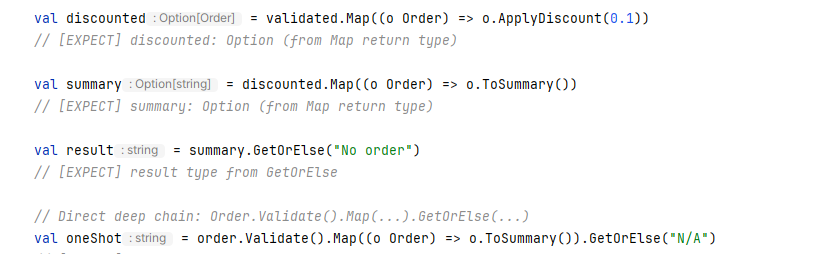
The transpiler tracks types through method chains: validated.Map(...) produces Option[Order], chaining .Map((o) => o.ToSummary()) produces Option[string], and .GetOrElse("No order") unwraps to string. Each step is visible in the editor.
Structure View
The plugin provides a structure view panel showing the outline of your GALA file — types, sealed variants, methods, and fields at a glance.
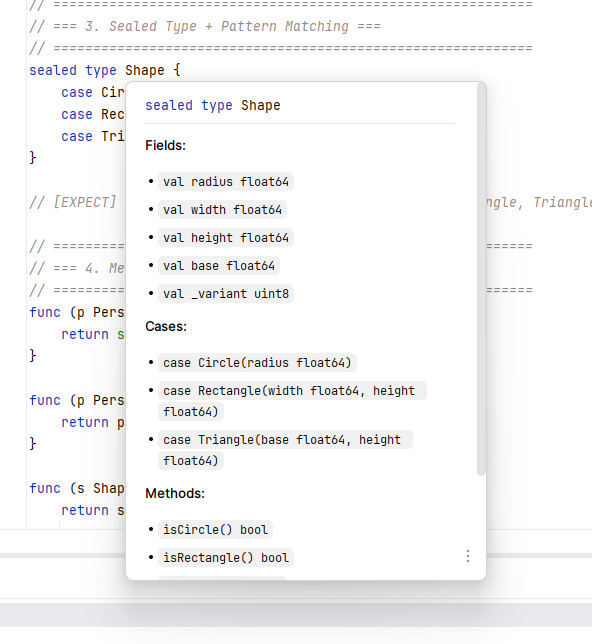
The structure view displays sealed type Shape with its variants (Circle, Rectangle, Triangle), each variant’s fields, and auto-generated methods like IsCircle(), IsRectangle(), IsTriangle().
Full Feature List
Plugin features (local, no LSP needed)
- Full ANTLR-based parser with complete PSI tree
- Syntax highlighting for keywords, types, strings, comments, operators, built-in functions, and std types
- Semantic annotator for built-in types, std types, built-in functions, and string interpolation
- Code folding for blocks, sealed types, and imports
- Brace matching
- Structure view with functions, types, and sealed types with cases
- Comment/uncomment
- Color settings page
- 12 live templates:
func,val,var,match,if,for,sealed,struct,lambda,main,println,sinterp
LSP features (via gala lsp)
- Diagnostics — parse errors, transpilation errors, unused variables, match exhaustiveness
- Hover — type signatures with fields, methods, sealed cases, built-in function docs
- Go to Definition — cross-file, local declarations, pattern bindings, named arg fields
- Find References — all usages of a variable, function, or type
- Completion — type-aware dot completion, named arguments, sealed case patterns, keywords
- Inlay hints — compiler-inferred types for all
val/vardeclarations - Document symbols — types, functions, sealed variants for outline view
- Debounced analysis — 500ms delay after last keystroke to prevent noise while typing
Installation
GoLand / IntelliJ IDEA
- Install the GALA CLI from releases and add it to your PATH
- Install the plugin: Settings > Plugins > Install from Disk > select
gala-intellij-plugin.zipfrom releases - Restart the IDE — the LSP server starts automatically when you open a
.galafile
VS Code
Add to .vscode/settings.json:
{
  "lsp.servers": {
    "gala": {
      "command": "gala",
      "args": ["lsp"],
      "filetypes": ["gala"]
    }
  }
}
Neovim
require('lspconfig.configs').gala = {
  default_config = {
    cmd = { 'gala', 'lsp' },
    filetypes = { 'gala' },
    root_dir = require('lspconfig.util').root_pattern('gala.mod', '.git'),
  },
}
require('lspconfig').gala.setup({})
Verify
Run gala lsp in a terminal. It should start and wait for JSON-RPC messages on stdin/stdout. If you see no output and no errors, the server is running correctly.